
Embed your Instagram feed
on your website
Sign up free with just your email. Paste one code snippet
to show your Instagram posts beautifully as a grid or slider.
New posts show up automatically.
✓ No credit card required✓ Sign up with just your email
Try it and see
how it looks
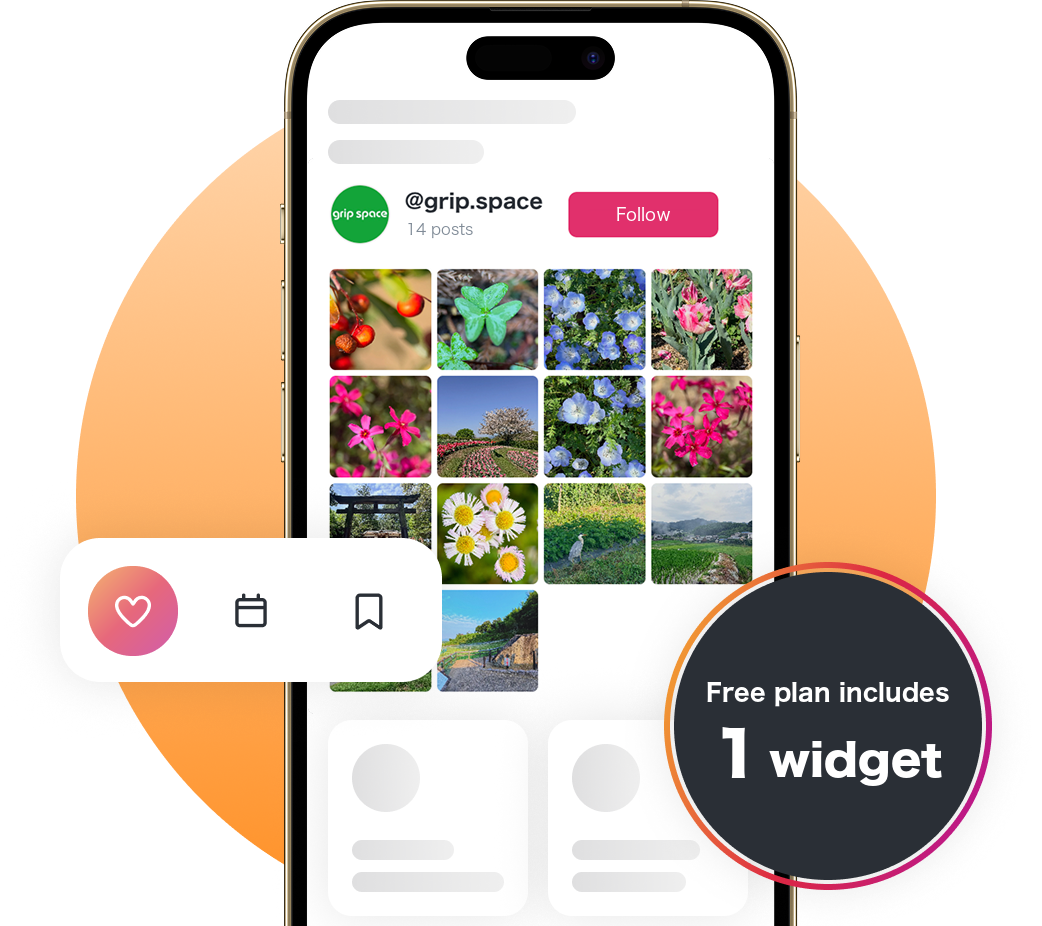
Embed your Instagram posts on your website as a grid or slider, while checking the preview.
Below is a demo using our official account. Change the settings and see the preview update.
To create a widget for your own account and get the embed code, sign up free (just an email address and password).
Instagram widget display options
that fit your site
Responsive
The layout adjusts automatically to look great on desktops, tablets and phones.

Grid & slider
Choose a classic grid or a horizontal slider. Set the columns, number of posts and spacing as you like.

Official Instagram API
Connects through the official Instagram API. Link your professional account (Business or Creator) securely.
Lightweight and fast
A lightweight design that does not slow down your site. Embedding takes just one code snippet.
Lightbox
Click a post to open it larger, together with its caption and number of likes.

Gain followers
Show your account info and a follow button to turn site visitors into followers.

Copy and paste
Just paste the embed code. It works anywhere you can add HTML, including WordPress.

Always up to date
New Instagram posts appear on your site automatically. No need to replace the code.
Show the posts you want,
in the order you want
On the Standard plan, you decide the order and the look of your feed to match your website.
Arrange posts freely
Drag posts into any order. For posts you publish later, choose whether they go first, last, or stay hidden.
Pin to top
Keep a campaign or best-selling product post at the front, even as new posts come in.
Custom CSS
Add CSS just for the widget to match corner radius, button colors and more to your site’s design.
Show your customers’ posts
with hashtag feeds
Coming soonWe’re building a feature that collects public posts tagged with your brand or product hashtag and shows them on your website. It will be part of the Standard plan.

Just enter a hashtag
Use up to 3 hashtags and collect posts by top or most recent.
Approve before posts appear
Show only the posts you approve. Posts with blocked words can be filtered out automatically.
Same look as your feed
Use the same grid or slider layouts and settings as your own posts.
Simple pricing,
pay for what you need
Free
$0
Views Up to 1,000 / month
Posts shown Up to 16
Post updates Once a day
A “Powered by Social Feed” link is shown below the feed
- Grid / slider layouts
- Responsive on mobile and desktop
- Posts update automatically
- Lightbox view
- Follow button
- Videos and carousel posts
- View counts
Light
$8 / month
$80 / year ($6.66 / month)
Views Up to 30,000 / month
Posts shown Up to 30
Post updates Instantly
Choose whether to show the credit link (hidden by default, so it matches your site's design)
- Grid / slider layouts
- Responsive on mobile and desktop
- Posts update automatically
- Lightbox view
- Follow button
- Videos and carousel posts
- View counts
No charge if you switch back to Free during the trial
Standard
$99 / month
$990 / year ($82.50 / month)
Views Unlimited
Posts shown Up to 50
Post updates Instantly
Choose whether to show the credit link (hidden by default, so it matches your site's design)
Arrange and pin posts
Custom CSS
Hashtag feeds (coming soon)
- Grid / slider layouts
- Responsive on mobile and desktop
- Posts update automatically
- Lightbox view
- Follow button
- Videos and carousel posts
- View counts
The Light plan comes with a 14-day free trial (first order only; a card is required, and there is no charge if you switch back to the Free plan during the trial).
You can also start with the Free plan and upgrade any time from your dashboard when you need more.
Views are the number of times your widgets are shown on your site (all widgets combined). If you go over the limit, your widgets keep showing until the end of the month; if you go over for two months in a row, they stop showing from the next month. We email you your view count every week.
Prices are in US dollars and exclude tax; applicable tax is added at checkout. Payment is by credit card and renews automatically. There is no minimum term, and you can switch back to the Free plan any time from your dashboard.
Terms of Service Legal Notice
✓ No credit card required✓ Sign up with just your email
Embed your Instagram feed in 4 steps
Create an account
Sign up free with just an email address and password.
The Free plan lets you create one widget at no cost.
Already have an account?
Log in
Log in with your email address and password to change settings or copy your embed code.
Log inNew to Social Feed?
(Free sign-up)
Get started right away with just an email address and password. Create one widget for free.
Sign up freeConnect Instagram
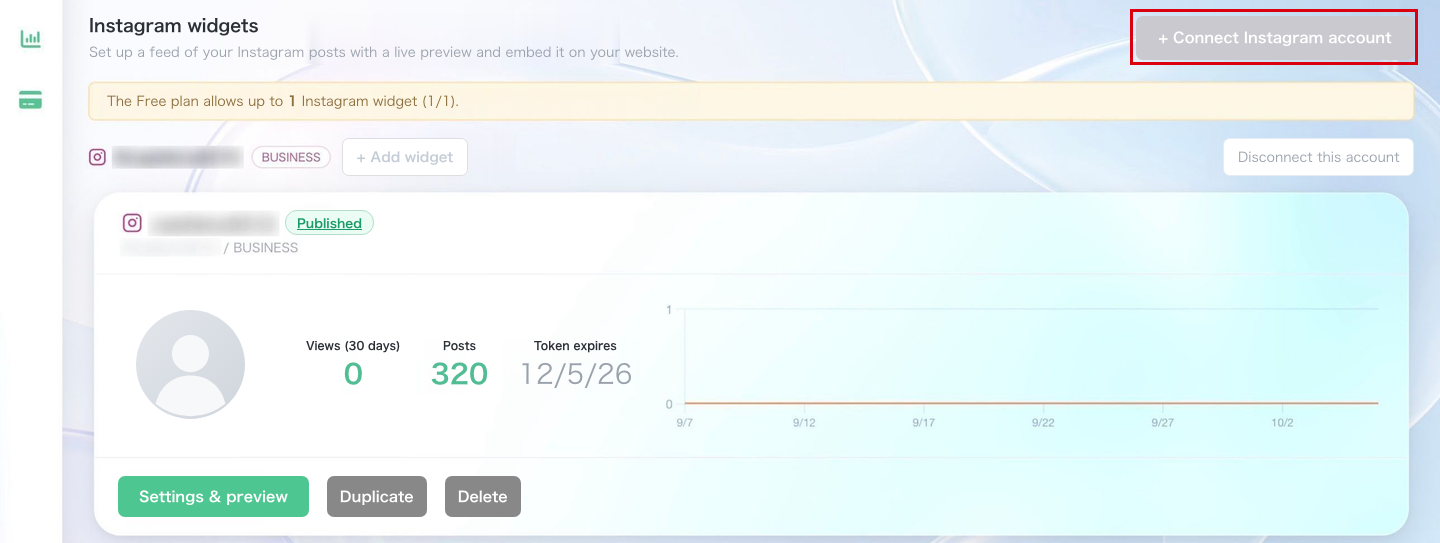
Click “+ Connect Instagram account” in the dashboard and connect your Instagram professional account (Business or Creator).
If you have a personal account, you can switch to a professional account for free in the Instagram app settings.
Customize the layout
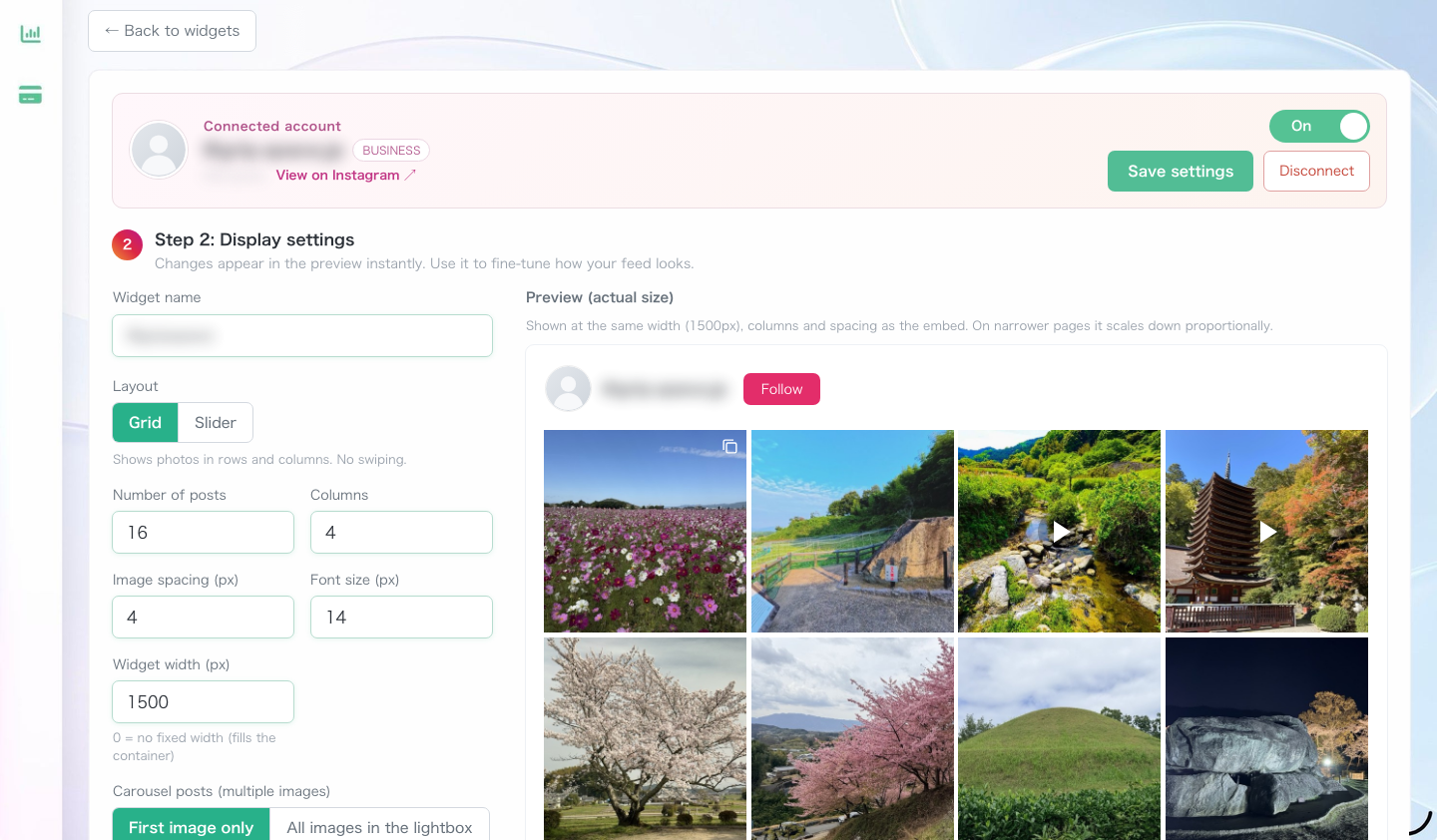
While checking the preview, choose grid or slider, and set the number of posts, columns, spacing, font size, what happens on click and more. Then save.
Paste the code and publish
Copy the embed code and paste it where you want your posts to appear. That's it. It works anywhere you can add HTML, including WordPress.

Great for
all kinds of sites

Corporate websites
Share your latest activities and brand story directly on your official site.

Online stores
Show products in use and staff outfits to encourage purchases.
Shops and restaurants
Show your menu and atmosphere in photos to bring in more visitors.

Recruiting sites
Share office life and events to show job seekers what your culture is like.
Frequently asked questions
With the Free plan you can create and embed one widget for free (up to 1,000 views a month and up to 16 posts; posts are updated on your site once a day, and a “Powered by Social Feed” link is shown below the widget). If you want two or more widgets, instant updates, or no credit link, choose the Light plan ($8/month, up to 3 widgets) or the Standard plan ($99/month, unlimited, with custom post ordering and pinning, custom CSS, hashtag feeds coming soon); the Light plan comes with a 14-day free trial on your first order. Prices exclude tax; applicable tax is added at checkout.
Views are the number of times your widgets are shown on your site (all widgets combined): up to 1,000 a month on the Free plan, 30,000 on the Light plan, and unlimited on the Standard plan. If you go over the limit, your widgets keep showing until the end of that month. If you go over for two months in a row, your widgets stop showing from the next month (they come back as soon as you change your plan). We email you when you reach 80% and 100% of your limit, and send your view count every week.
To embed your feed with Social Feed, you need an Instagram professional account (Business or Creator). If you have a personal account, switch to a professional account for free in the Instagram app settings, then connect it.
Yes. The embed code works anywhere you can add HTML. You can paste it into WordPress pages, posts, widget areas and more.
Yes, automatically. You don't need to replace the code. On paid plans new posts appear right away; on the Free plan they are updated once a day (right after you embed the widget, your latest posts are shown immediately).
Instagram’s embed code shows one post at a time. When you publish something new, it doesn’t appear on your site until you copy and paste another code. Social Feed shows a feed of your latest posts and adds new posts automatically, and you can adjust the layout, such as grid or slider and the number of columns, to match your site.
Yes. While checking the preview, you can switch between grid and slider, set the columns, number of posts, spacing and font size, choose what happens on click (open a lightbox or Instagram), and show or hide your account info and follow button.
Yes. Start with the Free plan and switch any time from “Plan” in the dashboard when you want more widgets. Payment is by credit card, and the new plan is available as soon as you finish.
Yes. You can switch back to the Free plan any time from “Plan” in the dashboard. You keep your paid plan until the end of the period you have paid for, and then move to the Free plan. Your account and widgets stay as they are.
Show your Instagram posts
on your website, too
With just an email address and password,
you can create one widget for free.
✓ No credit card required✓ Sign up with just your email