
Juicer alternative if you only need Instagram
Juicer is built to pull posts from many social networks into one “social wall.” That is exactly right when you want Instagram, TikTok, YouTube, Facebook and Google Reviews together. But many sites only want their own Instagram posts on the home page or in the footer, and then a large part of what Juicer charges for goes unused. This article explains the difference between a social wall and a single-network feed, compares Juicer’s plans with Social Feed by grip space for Instagram-only use, and is honest about where Juicer is still the better tool.
Updated October 12, 2026
The short answer
- You want several networks, hashtags or reviews in one feed: stay with Juicer, or choose another aggregator. Social Feed by grip space shows only your own Instagram account, so it cannot replace a multi-network wall.
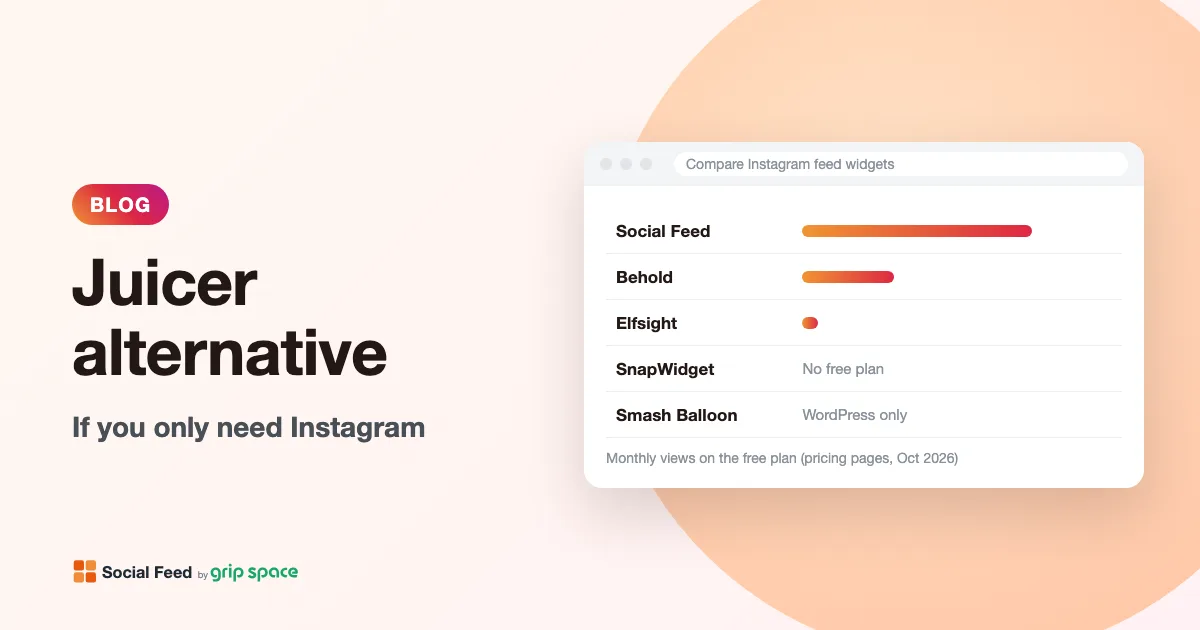
- You only show your own Instagram account: a single-network widget usually gives you far more views for the money. Juicer’s free plan allows 300 views a month and its Lite plan 5,000 for $15 a month; our free plan allows 3,000 and our Light plan 30,000 for $8 a month.
- You need to approve or hide individual posts: Juicer has moderation (manual on Free and Lite, automatic from Starter). We offer filters instead: by post type, date range and caption keywords, but not post-by-post hiding.
- You want both: it is fine to keep a Juicer wall on one campaign page and use a lighter Instagram widget everywhere else.
Social wall vs single-network feed
The two kinds of tools look similar on a web page, a grid of photos, but they are built for different jobs.
A social wall, or aggregator, collects content from many places. Juicer’s pricing page defines a feed as a collection of sources shown on your site, “sometimes called a board or wall,” and a source as “a social account or hashtag from one network.” One Juicer feed might combine your Instagram account, a hashtag, your YouTube channel and your Google Reviews. Plans are priced by the number of sources and feeds, plus views and refresh speed. Features such as moderation, custom posts and calls to action exist because mixed content needs curation.
A single-network feed widget does one thing: show posts from one Instagram account. There is nothing to combine, so there are no sources to count, and the tool can focus on presentation (layout, lightbox, header) and on choosing which of your own posts to show. Pricing is based on the number of widgets and monthly views.
| Social wall (Juicer) | Single-network widget (Social Feed by grip space) | |
|---|---|---|
| Content | Many networks, hashtags, reviews, RSS, custom posts | Your own Instagram posts only |
| Priced by | Sources, feeds, views, refresh speed | Widgets, views, posts per widget |
| Curation | Moderation of individual posts | Filters by type, date and caption keyword |
| Typical use | Event walls, community and UGC pages, brand hubs | Home page, footer, About or product pages |
What Juicer offers
Juicer’s home page says it “helps you embed, curate, and aggregate all your social content into one stunning social media feed.” Its setup section lists 16 networks, including Instagram, LinkedIn, Facebook, TikTok, YouTube, X (Twitter), Bluesky, Google Reviews, blog RSS, Pinterest, Tumblr, Vimeo, Flickr and SoundCloud. It lists 11 templates, among them grid, masonry, slider and list styles with dark variants, plus custom CSS, calls to action, custom posts and “Juicer Pages,” a landing page builder. Embedding is described as “Copy and paste a snippet of code or use our WordPress plugin.”
The pricing page states that every plan includes “Unlimited website embeds,” that one feed can appear on many pages, and that there is no limit on client sites. It also says Juicer complies “with GDPR standards for data protection and privacy,” that payments run through Stripe, and that the currency is US dollars only.
Juicer’s plans
| Plan | Price | Sources / feeds | Views a month | Refresh | Moderation | Branding |
|---|---|---|---|---|---|---|
| Free | $0 | 1 source, 1 feed | 300 | Every 24 hours | Manual | Juicer branding |
| Lite | $15 a month ($13.50 a month paid yearly) | 3 sources, 1 feed | 5,000 | Every 60 minutes | Manual | No Juicer branding |
| Starter | $25 a month ($22.50 paid yearly) | 5 sources, 1 feed | 20,000 | Every 60 minutes | Automatic | No Juicer branding |
| Pro | $99 a month ($89 paid yearly) | 30 sources, 3 feeds | 100,000 | Every 10 minutes | Automatic + AI | No Juicer branding |
| Enterprise | From $199 a month, paid yearly, usage dependent | Unlimited | Unlimited | Down to 1 minute | Automatic + AI | 100% ad-free |
Add-ons are listed at $10 per source, $8 per feed and $5 per 10,000 views. Juicer also lists an Event plan at $299 a year (7 days of real-time updates across 5 sources, then a year of daily updates) and white-label as a paid add-on. On the Free plan, X, LinkedIn and hashtag sources are available only during a one-week trial of Pro features. Yearly billing is 10% off, for card payments only.
Our plans
| Plan | Price | Widgets | Views a month | Posts per widget | New posts appear | Branding |
|---|---|---|---|---|---|---|
| Free | $0 | 1 | 3,000 | Up to 16 | Once a day | “Powered by Social Feed” link |
| Light | $8 a month or $80 a year | Up to 3 | 30,000 | Up to 30 | Right away | Hidden by default |
| Standard | $24 a month or $240 a year | Unlimited | Unlimited | Up to 50 | Right away | Hidden by default |
All plans include the same layouts, lightbox and filters. On paid plans, the widget asks Instagram for your posts each time it is shown, so new posts appear as soon as Instagram makes them available. See pricing for details.
If you only need Instagram: what you pay for
Suppose your Juicer feed has one source: your own Instagram account. Here is what that means on each Juicer plan:
- On Free, one source is exactly what you get, but 300 views a month is about 10 page views a day. A feed in a site-wide footer can use that up very quickly, because each page that shows the feed counts.
- On Lite, you pay $15 a month for three sources and use one. The main gains are 5,000 views, hourly refresh and no branding.
- On Starter, you pay $25 a month for five sources and automatic moderation. With one Instagram source, the 20,000 views are what you are really buying.
- On Pro, 30 sources and AI moderation at $99 a month are far more than a single account needs.
None of this makes Juicer overpriced; its plans are priced for combining networks. It just means that for an Instagram-only feed, most of the plan is capacity you do not use.
Instagram-only: side by side
Here are plans of similar size compared for one Instagram account. Prices are monthly billing.
| Need | Juicer | Social Feed by grip space |
|---|---|---|
| Free | 300 views, 24-hour refresh, Juicer branding | 3,000 views, once a day, credit link shown |
| Up to 5,000 views | Lite: $15 a month, hourly | Light: $8 a month (30,000 views), right away |
| Up to 20,000 views | Starter: $25 a month, hourly | Light: $8 a month, right away |
| Up to 30,000 views | Starter plus a 10,000-view add-on: $30 a month | Light: $8 a month |
| Up to 100,000 views | Pro: $99 a month, every 10 minutes | Standard: $24 a month, no view limit |
| More than 100,000 views | Pro plus view add-ons, or Enterprise | Standard: $24 a month |
Over a year with yearly billing, the 20,000-view case is $270 on Juicer Starter and $80 on our Light plan; the 100,000-view case is $1,068 on Juicer Pro and $240 on our Standard plan. The comparison is fair only if you truly need nothing but your own Instagram posts. If you use even one more network, hashtag or review source, Juicer’s plans include features ours do not have at any price.
Estimating your monthly views
Views decide which plan you need with either tool, so it is worth five minutes to estimate them before comparing prices.
- List every page that shows the feed. Include site-wide places such as a footer or sidebar; those count on every page of the site.
- Look up last month’s page views for those pages in your analytics tool. If the feed is in the footer, use the total page views for the whole site.
- Add room for busy months. Sales, launches and holidays can double traffic for a few weeks.
- Compare with each plan. Under 3,000 fits our Free plan, under 30,000 fits Light, and anything above needs Standard. On Juicer, compare with 300, 5,000, 20,000 and 100,000, plus view add-ons.
If the number is high mainly because of a footer feed, consider placing the feed only on the pages where it helps most, such as the home page and the About page. That one change can move you to a smaller plan with either tool.
What Juicer does that we don’t
- Other networks and reviews. TikTok, YouTube, Facebook, LinkedIn, X, Bluesky, Pinterest, Google Reviews, RSS and more, combined in one feed.
- Hashtag sources. Show public posts with a hashtag (paid plans, or a one-week trial on Free). We show only your own account.
- Moderation. Approve or hide individual posts manually, automatically from Starter, and with AI moderation on Pro.
- Custom posts and calls to action. Add your own posts to the feed and buttons that point to your pages.
- More templates and custom CSS. 11 templates including masonry and list styles, plus custom CSS on the Free plan card.
- Juicer Pages and an API. A landing page builder and a paid API that pulls posts from 15+ platforms.
- A WordPress plugin. If you prefer to place feeds with a plugin rather than pasting code.
If any of these are part of how you use Juicer today, switching to an Instagram-only widget would be a step backward.
What Social Feed by grip space does differently
- More views on smaller plans. 3,000 views free and 30,000 on Light, because there are no other networks to pay for.
- New posts right away on paid plans, instead of an hourly refresh.
- Filters made for Instagram. Show only Reels or hide them, hide carousel posts, include or exclude videos, show only the last 30, 90 or 365 days, and show only (or hide) posts whose captions contain chosen words.
- Instagram-style presentation. A grid or slider with an account header (profile picture, name, post count) and a Follow button with your own label and color. The lightbox plays videos and can show every image of a carousel post.
- Several widgets from one account. Copy a widget’s settings and change its filters, for example Reels on one page and recent photos on another (how it works).
- A light script. One script tag, no iframe, no cookies and no local storage. Images load from Instagram’s servers, and in a grid only the first row loads before the visitor scrolls.
- Accessible by default. Images get alt text (Instagram’s own alt text, otherwise the start of the caption), tiles work with the keyboard, and the lightbox closes with Escape.
- View counts per widget, with a chart, on every plan.
Moderation or filters?
People often choose Juicer for moderation, so it is worth asking what you actually moderate. On a multi-source wall, moderation is essential: a hashtag can bring in posts from anyone. On a feed of your own account, you already control what is posted, and curation is usually about choosing which of your posts fit a page.
Filters can cover many of those cases without approving posts one by one:
- Only show posts about one topic. Put a word or your own hashtag, such as #menu or #newarrivals, in the caption and set the widget to show only posts containing it. See filtering by keyword.
- Keep certain posts off the site. Use the exclude option with a word that appears only in those captions.
- Hide old content. Show only posts from the last 30, 90 or 365 days (how).
- Separate Reels from photos. Show Reels only, or exclude them (how).
What filters cannot do is hide one specific post that has nothing special in its caption, or pin a post to the top. If you need that, Juicer’s moderation, or another tool with post-level curation, is the better fit.
How to switch your Instagram feed from Juicer
Both tools read posts directly from Instagram, so there is nothing to export.
- Check your Instagram account type. Our widget uses the official Instagram API, which needs a Business or Creator account. Switching from a personal account is free (how to switch).
- Create a widget. Sign up, click “+ Connect Instagram account” and sign in with Instagram. Open “Settings & preview”.
- Set it up to match your current feed. Choose grid or slider, columns, number of posts and spacing. If your Juicer feed hid certain posts, recreate that with keyword, date or type filters and check the preview.
- Find every place the Juicer code is used. Juicer allows unlimited embeds, so the same feed may be on several pages, in a footer or in a theme template. If you used Juicer’s WordPress plugin, look for its blocks or shortcodes.
- Replace the Juicer code with our embed code from “Add the embed code to your website”:
<script type="text/javascript" src="https://n246.grip.space/api/v1/instagram/widget/xxxxxxxx"></script>- Check the live pages on a phone and a computer. Many editors do not run scripts in their editing view (why).
- Downgrade or cancel your Juicer plan once the new feed is live everywhere, if you no longer use other sources. Juicer’s FAQ says you can change or cancel your plan at any time.
Platform-specific steps are in our guides for WordPress, Shopify, Wix, Squarespace, Webflow and plain HTML.
What changes in the design
Juicer’s templates are made for mixed content: each post card can come from a different network, with the source’s icon and often the text of the post. An Instagram widget looks more like an Instagram profile. Expect these differences after switching:
| Juicer | Social Feed by grip space |
|---|---|
| Grid, masonry, slider and list templates, with dark variants | Grid or slider; text color setting for light or dark backgrounds |
| Post text shown on the card in many templates | Images only in the grid; caption and like count in the lightbox |
| Custom CSS | Columns, spacing, max width, font size and text color settings; no custom CSS |
| Calls to action on posts | A Follow button in the account header |
| Network icons on each post | An Instagram icon on hover (optional) and icons for videos and carousels |
Because our widget is not in an iframe, it uses your page’s font and fills the width it is given up to the max width you set. Our article on matching the feed to your website’s design has tips, and grid or slider? helps you pick a layout.
Privacy notes
Juicer’s pricing page says it complies with GDPR standards and links to its privacy policy. Our widget sets no cookies and uses no local storage, and view counts do not identify visitors. In both cases, the images come from the social networks’ servers, so visitors’ browsers connect to them when the feed is shown. Mention the feed in your privacy policy, and if your consent tool blocks third-party content until visitors agree, treat either feed like other embedded content.
Using both tools
You do not have to choose one for the whole site. A common split is:
- Juicer for the social wall: a “community” or event page that mixes Instagram, TikTok, reviews and a campaign hashtag, with moderation.
- An Instagram widget everywhere else: your latest posts on the home page, in the footer and on product pages, where views add up quickly.
This keeps the busy pages off your Juicer view allowance, which may let you stay on a smaller Juicer plan.
Frequently asked questions
Does Juicer have a free plan?
Yes. Juicer’s pricing page lists a Free plan at “$0 Forever” with one feed, one source, 300 views a month, a 24-hour refresh, manual moderation and Juicer branding.
What happens if I go over Juicer’s view limit?
Juicer sells extra views as an add-on ($5 per 10,000). The pricing page we checked does not describe what happens to the feed when the limit is reached, so ask Juicer. With our widget, the feed keeps showing for the rest of the month and stops only if you go over two months in a row (details).
Can your widget show a hashtag, TikTok or reviews?
No. It shows posts from your own Instagram professional account only, one account per widget.
Can I use one widget on several pages, like a Juicer feed?
Yes. Paste the same embed code on as many pages as you like; every page shows the same feed and its views add up to one total. If different pages need different posts, create separate widgets with their own filters (one widget on Free, three on Light, unlimited on Standard).
Is your free plan enough for a small business?
Often, yes: 3,000 views a month, up to 16 posts and daily updates, with a small credit link. Read what the free plan includes.
Where can I compare more tools?
Our comparison of 10 Instagram feed tools covers Juicer alongside Curator.io, EmbedSocial, Flockler and simpler widgets, and Smash Balloon alternative covers WordPress plugins.
Sources
- Juicer pricing (plans, sources, views, refresh, moderation, add-ons, Event plan, FAQ, GDPR, currency): https://www.juicer.io/pricing
- Juicer home page (networks, templates, embedding, features): https://www.juicer.io/
- Social Feed by grip space: pricing and about the service
Get your embed code in a few minutes. The Free plan needs no credit card.
Sign up freeMore articles
WordPress Instagram plugin or embed widget: which should you use?
A WordPress Instagram plugin runs on your server; an embed widget is a hosted script. How each handles updates, caching, user roles and moving platforms.
Read the article →
Instagram feeds and GDPR: what data flows when you embed one
What a visitor’s browser sends, and to whom, when your site shows an Instagram feed: our server, Instagram’s image servers, cookies and GDPR questions.
Read the article →
Do you need cookie consent for an Instagram feed on your website?
What the cookie rules cover, how Instagram’s native embed and a feed widget differ, what regulators say about embeds, and how to load a feed after consent.
Read the article →
What to write in your privacy policy about Instagram embeds
A plain-language checklist for describing an Instagram feed or embedded post in your privacy policy, with sample wording to adapt and official guidance.
Read the article →
Using Instagram photos on your website: copyright and permission basics
Who owns the photos in your Instagram feed, what Instagram’s Terms of Use say, and when to get permission before showing posts on your site. Not legal advice.
Read the article →
Instagram feed for event, festival and conference websites
How festivals, conferences and recurring events can use an Instagram feed: one hashtag per edition, recent-days filters, past editions and event-day timing.
Read the article →